Knowledge
Redis object cache in WordPress: what it does and how to set it up
A Redis object cache keeps WordPress database data between requests, so the dashboard, the cart and logged-in users wait less on the database. For anonymous visitors who already get a page from the page cache it adds little. This guide explains what an object cache does, when WordPress itself recommends one, how to set up Redis, what you can use without Redis and how Spark Speed, the cache plugin we make, handles it.
In short
- An object cache speeds up everything that has to go through WordPress: dashboard, cart, checkout, logged-in users
- Next to a page cache, not instead of one
- The plugin alone is not enough: your host has to provide a Redis server
- Without Redis, Memcached, SQLite or files are alternatives
What an object cache does
WordPress keeps the results of database queries in memory during a request. After that request everything is gone. The WordPress documentation puts it like this: data is not stored persistently across page loads unless you install a persistent caching plugin. Such a plugin places the file object-cache.php in wp-content, and from then on WordPress keeps that data in Redis, Memcached or another store, so the next request does not have to fetch it from the database again.
Object cache or page cache: what speeds up what
A page cache stores complete HTML and serves it to anonymous visitors, often before WordPress even starts. An object cache has little to add there. An object cache helps with everything that does have to go through WordPress: the dashboard, logged-in users, the WooCommerce cart, checkout and my account, search results and rebuilding the page cache. They complement each other; one does not replace the other.
Do you need one? What WordPress itself advises
WordPress has a check for a persistent object cache in Site Health. In the source code of WordPress 7.0.2 that check only recommends one on a multisite, or once one of these thresholds is exceeded. A small brochure site with a good page cache usually stays below them.
- more than 500 autoloaded options, or more than 100 kB of them
- more than 1,000 posts, comments, terms, users or options
- the thresholds can be changed with the filter
site_status_persistent_object_cache_thresholds
Setting up Redis with the Redis Object Cache plugin
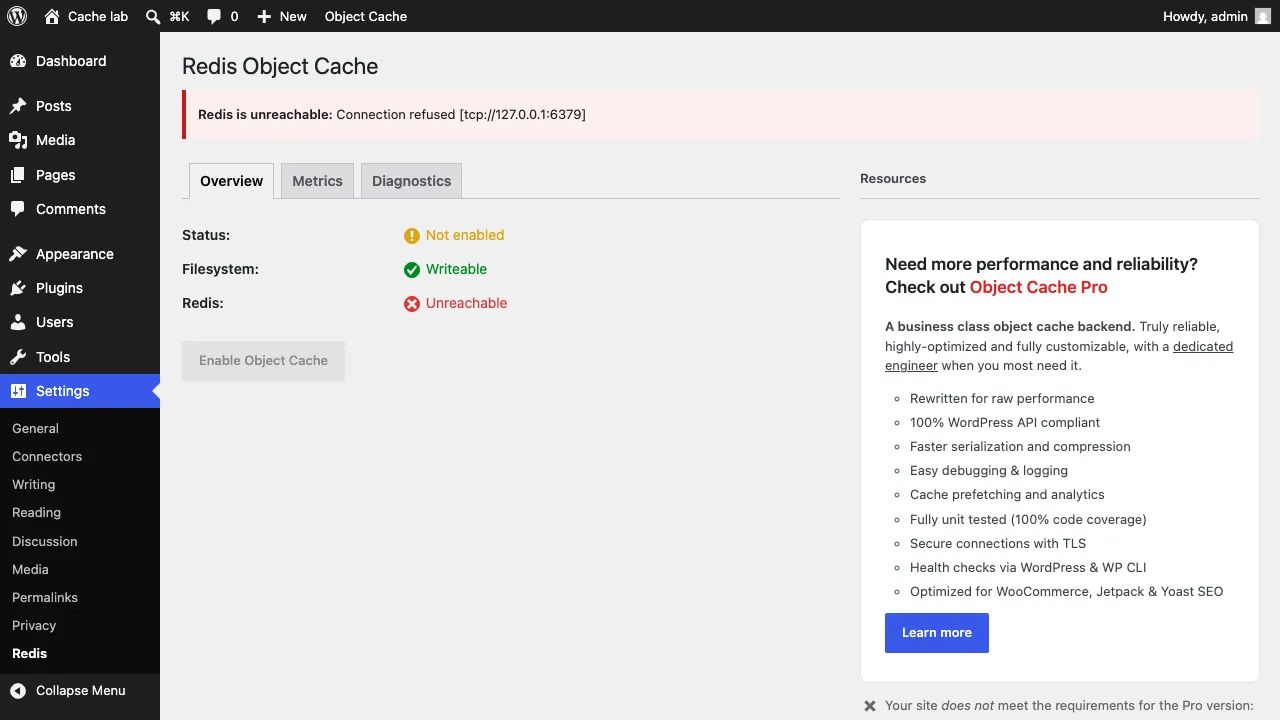
The plugin alone is not enough: a Redis server that PHP can reach has to be running. On shared hosting it is often not there, and then you cannot start one yourself. Ask your host whether Redis is available and at which address. In our lab no Redis server was running: the plugin reported Connection refused and kept the Enable Object Cache button disabled. That is a safe choice by the plugin.
- Ask your host whether Redis is available, and at which address or socket
- If Redis is not at 127.0.0.1:6379, set
WP_REDIS_HOSTandWP_REDIS_PORT(and if neededWP_REDIS_PASSWORD) in wp-config.php - If you share Redis with other sites, give each site its own
WP_REDIS_PREFIXor database: otherwise flushing can hit the whole Redis database - Install Redis Object Cache, go to Settings, Redis and click Enable Object Cache
- Check with
wp redis status: Status should show Connected
Alternatives: Memcached, APCu, SQLite and files
No Redis? Then there are other stores. Memcached works in a similar way and comes with some hosting plans. APCu keeps data in PHP's own memory, but per PHP process, so WP-CLI and the web server do not always see each other's changes. SQLite and files need no separate server and therefore also work on basic hosting.
| Plugin | Storage | Active installs | Rating | Last update | Minimum PHP |
|---|---|---|---|---|---|
| Redis Object Cache | Needs a Redis server; PhpRedis, Predis or Relay | 500,000+ | 4.5 (179) | 18 Sep 2026 | 7.2 |
| Docket Cache | Stores in PHP files, no Redis needed | 20,000+ | 4.9 (50) | 15 Oct 2026 | 7.2.5 |
| SQLite Object Cache | Stores in an SQLite file, no Redis needed | 10,000+ | 5.0 (51) | 17 Aug 2026 | 5.6 |
Figures from wordpress.org, retrieved on 16 October 2026. Installs are the rounded numbers wordpress.org shows.
How the object cache works in Spark Speed
Spark Speed, the cache plugin we make, has its own object cache as a switch on the Cache tab. What to expect, from the code of version 0.73.2 and our documentation:
- Spark picks the store the server offers, in this order: Redis, Memcached, SQLite and APCu. A configured
WP_REDIS_HOSTalways wins. - Without
WP_REDIS_HOST, Spark tries 127.0.0.1:6379 and then the known Redis socket paths that exist on the server. - If another plugin's object-cache.php is already there, Spark does not overwrite it.
- If Redis is set to the noeviction policy, Spark warns: Redis then refuses new writes when memory is full, instead of evicting old keys.
- Page cache and object cache each have their own clear button; clearing one does not clear the other.
- If your host already provides an object cache, leave the switch in Spark off.
Tuning Redis
Two settings decide whether Redis keeps working well as a cache. maxmemory gives Redis a memory limit. maxmemory-policy decides what happens when that limit is reached. The Redis documentation calls allkeys-lru a good default for a cache: the least recently used keys are evicted. With noeviction Redis returns an error on writes once it is full. On shared or managed hosting the host sets this; ask if in doubt.
Checking and clearing
Whether WordPress uses a persistent object cache shows in Site Health and with WP-CLI. After a change made directly in the database, for example an import or an SQL query, clear the object cache, otherwise WordPress still shows the old value.
wp cache flushclears the object cache (works with any object cache plugin)wp redis statusshows status, client and drop-in of Redis Object Cachewp spark-speed flush-object-cacheclears the Spark Speed object cache- In Redis itself,
keyspace_hitsandkeyspace_missesfromINFO statsshow how often the cache hits
Turn on only one object cache at a time. Two plugins that both want to manage object-cache.php get in each other's way.
Spark Speed combines page cache and object cache and picks the store your server offers.
Frequently asked questions
Mainly the parts that do not come from the page cache: the dashboard, cart and checkout, logged-in users and search results. Pages that already come from the page cache get little faster.
Both keep object cache data in the memory of a separate server. For WordPress they do the same job; which one you choose mainly depends on what your host offers.
Only if your host offers Redis. On shared hosting you usually cannot start a Redis server yourself. Without Redis you can use an object cache on SQLite or in files.
With wp cache flush via WP-CLI, or with the button of your object cache plugin. Do this after changes made directly in the database.