Troubleshooting and recovery
This guide helps when something does not do what you expect: a page does not come from the cache, the cache build has stopped or something no longer works after an optimization. For each situation you see what it looks like, the usual cause and what to do. One distinction matters: restoring your Spark Speed settings is something else than restoring a full site backup.
In short
- The x-spark-speed-reason header tells you why a page did not come from the cache
- Resume a stopped warmer with Resume warmer
- Something broken: switch the optimization off, restore settings or use the emergency stop
- If it still does not work after switching off, Spark Speed is usually not the cause
A page does not come from the cache
Open the page in a private window and look at the headers in your browser's network tab, or make a normal GET request. Do not use a HEAD request (such as curl -I): it has no body and is therefore reported as too short.
- No x-spark-speed headers: the page came straight from the cache through Apache. That is good.
- MISS with the reason DONOTCACHEPAGE set by another plugin: another plugin, such as WooCommerce on cart and checkout, wants this page not to be cached. That is intended.
- MISS with a bypass cookie as the reason: the visitor has something in the cart or is logged in, for example. That is intended.
- MISS because a stylesheet is being rebuilt: your builder is regenerating its CSS. Wait a moment and try again.
The cache build has stopped
On the Cache tab, card Cache build, you see how many pages are ready. If there is a red message such as Blocked by the site with an error like cURL error 7, your site cannot reach itself. We saw that on our test site, where the server could not reach itself through its own address. After fixing that, Resume warmer reported that the site answered correctly and the build continued.
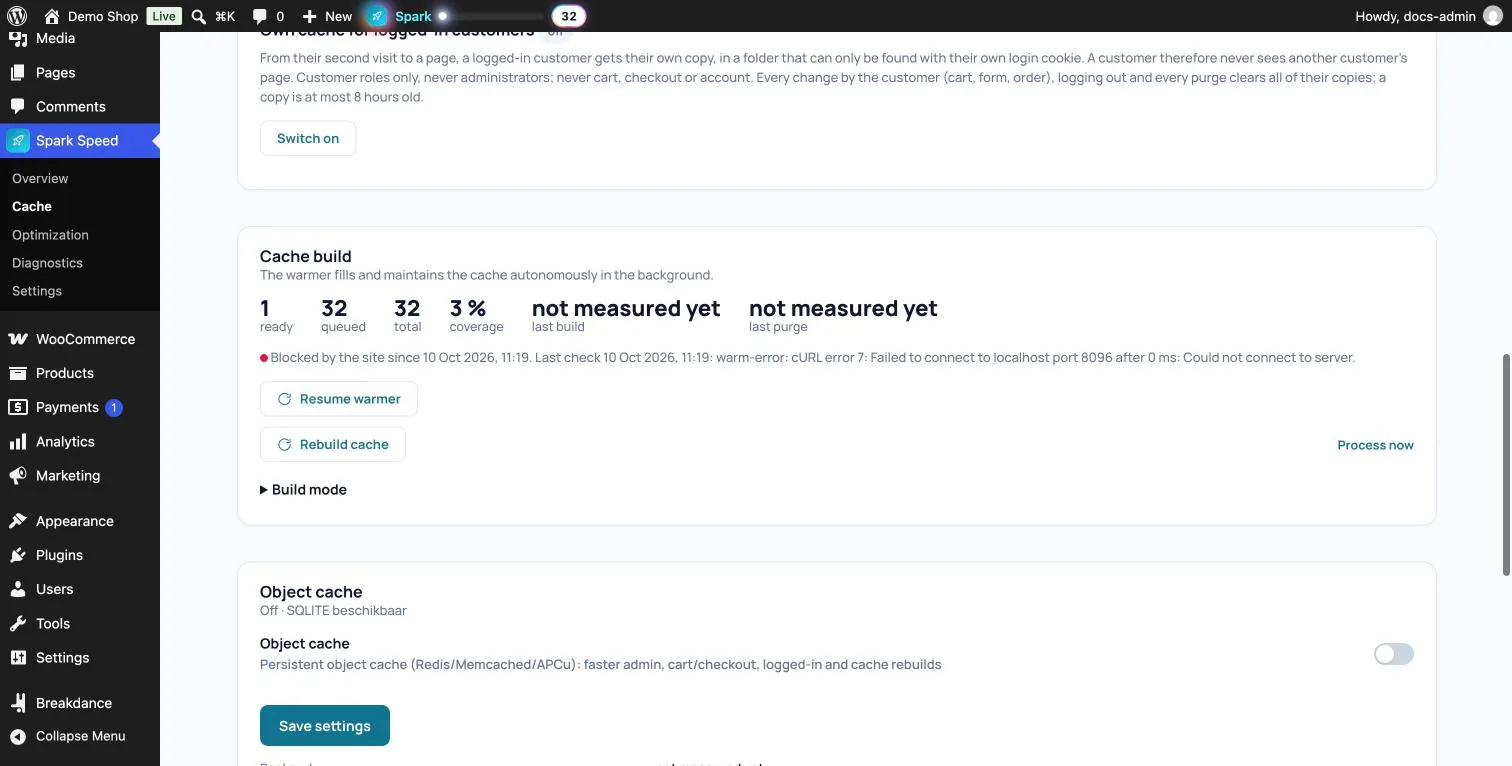
If Resume warmer does not solve it, ask your hosting provider whether the site may reach itself (loopback) and whether WP-Cron runs. The Issues on the Overview also mention such problems, for example a queue without a wake source.
Something no longer works after an optimization
Work from small to large. Start with the smallest step and check again in a private window after each step.

When to get help
If something still does not work after the emergency stop, Spark Speed is probably not the cause. Then bring in your developer or hosting provider, or contact us. Send the diagnostics report along (Overview, Download report): it contains your server, PHP, cache, plugins and the optimizer's earlier decisions, without you having to work anything out. A developer's help is wise with custom scripts, several servers or your own CDN, and with errors in checkout or customer accounts.
Restoring settings or a site backup
An exported Spark Speed file only restores Spark Speed's settings; site and server specific values deliberately do not travel in it. It does not touch your posts, products, orders or the rest of your database. For that you need a full backup from your hosting provider or a backup plugin.
Unsure about a step? Revert, check your site and ask us through the contact page.
No Spark Speed yet? See what it does and what it costs.
Frequently asked questions
Click Clear cache at the top and look in a private window. On a Breakdance site, see the Breakdance guide for when the cache refreshes itself.
No, but your site is slower until you switch caching back on. Use it to investigate, not as a permanent setting.
The diagnostics report (Overview, Download report) and a short description of what you did and saw. Never send your licence key.